Financial statement spreading and analysis
Compare the statements without losing the detail that explains them.
SpreadSpace™ organizes supported financial statements into a review of earnings, liquidity and repayment capacity. Compare reporting periods, inspect source-backed figures and bring supporting schedules into the discussion.
Work with balance sheets, profit and loss statements and cash flow statements, alongside supported aging reports, debt schedules and personal financial statements.
No-AI data extraction. No OCR. No offshore review shops. Better extraction pricing.
From financial statements to clear analysis
Convert financial statements and supporting schedules into comparable spreads, charts and coverage analysis, with the source detail available for review.
Statements into comparable spreads
Organize balance sheets, income statements and cash flow statements in a consistent view. Compare revenue, margins and working capital across reporting periods.
Line items into visual summaries
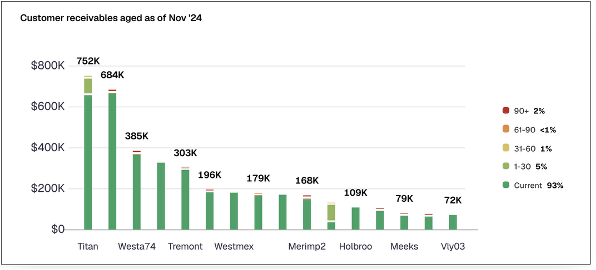
Turn rows of balances and activity into charts that make changes, concentrations and aging patterns easier to review.
Earnings and debt into coverage
Bring the selected earnings basis, analyst adjustments and debt service together for historical and proposed-debt coverage analysis.
Spread figures back to their source
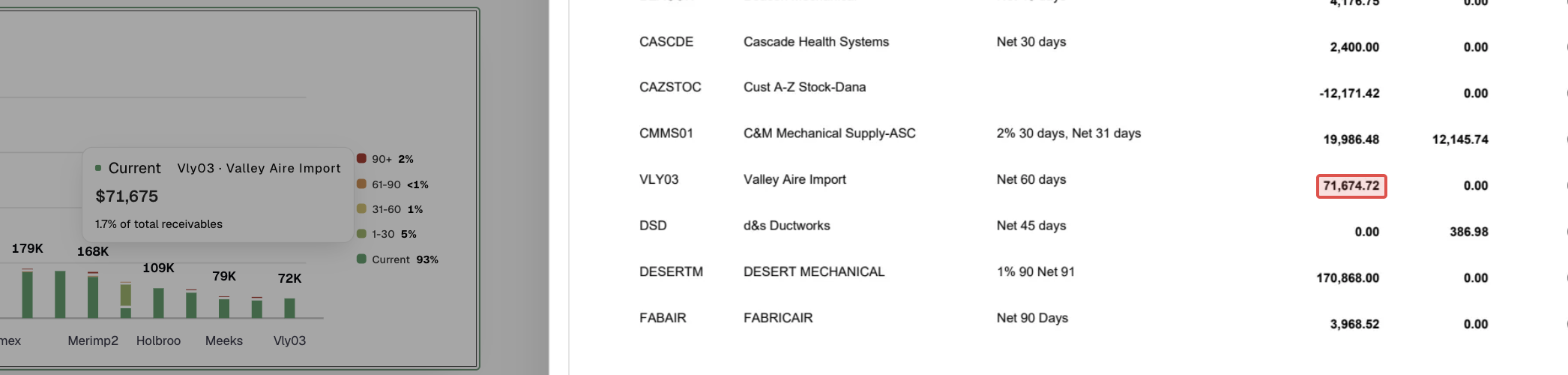
Trace a chart value or spread figure to its supporting document, with a bounding box highlighting the source amount.
Build a view that keeps its context
A comparison is only useful when the reviewer understands what is being compared. Keep the company, reporting period and source document attached to the financial information.
SpreadSpace brings the statements into an organized analysis so the reviewer can examine performance across the supplied periods and then return to the supporting evidence. A chart can show the change; the source helps explain it.
Read the components behind the total
A current-assets figure may combine cash, receivables, inventory and other amounts. Those components are not interchangeable simply because they appear under the same heading.
Use source review and available component detail to examine what supports a total. The same approach applies when a liability amount needs to be understood before it is used in an assessment of repayment capacity.
For supported derived figures, inspect the contributing rows rather than treating the summarized amount as self-explanatory.
Connect working capital to the schedules
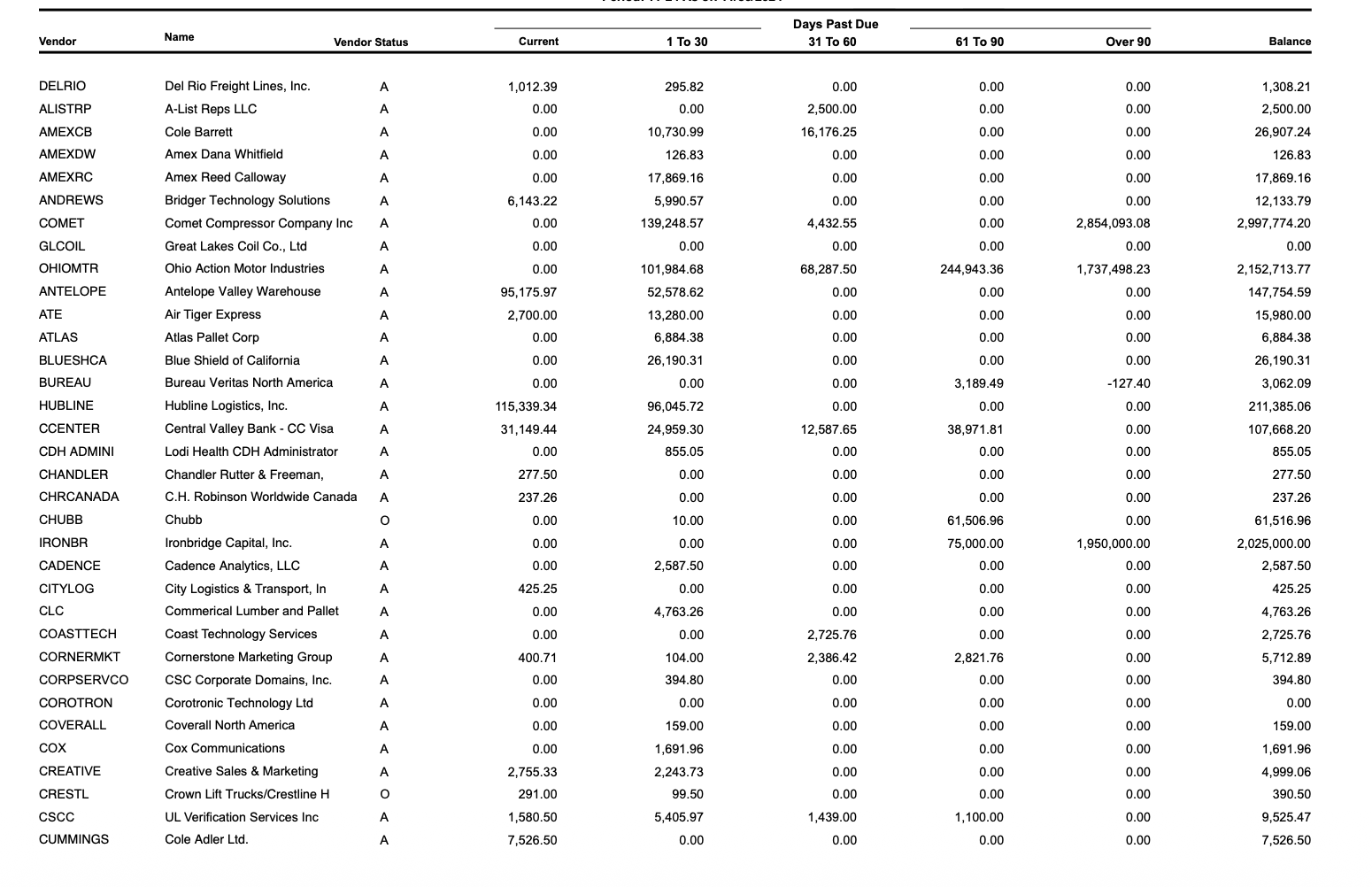
Bring accounts receivable and accounts payable aging reports alongside the financial statements. Review the supplied balances and aging detail when investigating the company's working-capital position.
For example, a higher receivables balance invites a different conversation when the supporting report shows that more of the balance is overdue. The point of connecting the schedule is to let the analyst examine that question, not to substitute an automatic conclusion for the review.
Keep the reporting dates in view when comparing a schedule with the statement it is being used to explain.
Examine changes across the periods provided
Compare revenue, expenses, earnings and balance-sheet movements. Use available monthly detail to investigate changes that a year-end comparison may leave unexplained.
An increase or decrease is a starting point for questions. Is the comparison over equivalent periods? What contributes to the movement? Does another document provide context? The workspace keeps the financial view and source review connected while the analyst works through those questions.
Bring earnings and obligations into coverage analysis
Review the selected earnings basis, analyst adjustments and debt service together. Compare a historical view with a pro forma view that includes proposed debt, keeping the assumptions available for the discussion.
A coverage figure should be explainable through the inputs used to calculate it. The analyst determines which supported inputs and adjustments belong in the loan's analysis.
Check the mathematics without hiding exceptions
For supported documents, SpreadSpace checks extracted figures against the mathematical relationships available in the document. An extraction that does not meet validation requirements is rejected. A retained extraction with a discrepancy includes an explicit notice for review.
Passing an arithmetic check does not establish the quality of the borrower's financial reporting or resolve every question in the credit file. Use it alongside the source and the analyst's review.
Turn the analysis into a reviewable explanation
Bring selected financial exhibits into the credit memo and write the explanation around the analysis. In the workspace, source-linked figures remain available when a reviewer wants to inspect the supporting detail.
The benefit is not simply another summary. It is a path from the summary to the information needed to understand it.
Financial statement document details
Explore the statements, aging reports, debt schedules and personal financial statements available for review. Integration details are in the docs.spreadspace.app.
Balance Sheet
Statement Spine
Every line item
Current Assets

Non-current Assets
Current Liabilities
Long-term Liabilities
Equity
Total Liabilities and Equity
Every period side by side
Standardized line names
Drill down from any total to its lines
Arithmetic checks on every subtotal
Audited, reviewed or compiled
Questions about financial statement spreading
Can we review more than the core statements?
Yes. Supported document families also include accounts receivable and payable aging reports, debt schedules and personal financial statements. Consult the published document details for coverage.
Does an accounting firm's involvement make the extraction an assurance opinion?
No. A document's stated level of accountant involvement is distinct from SpreadSpace's extraction and validation behavior. The platform supports the review of the supplied information; it does not issue an audit or review opinion.
Can we compare statements with returns and bank activity?
Bring the available sources into the same financial-review workflow while keeping their entities, periods and reporting context distinct. The analyst evaluates differences rather than assuming each source should represent the same thing.
See what supports the spread
Bring a statement package and its supporting schedules. Review a material change, inspect the components behind a total and follow the evidence into the credit memo.